AI release management: your release is a plan with an agent
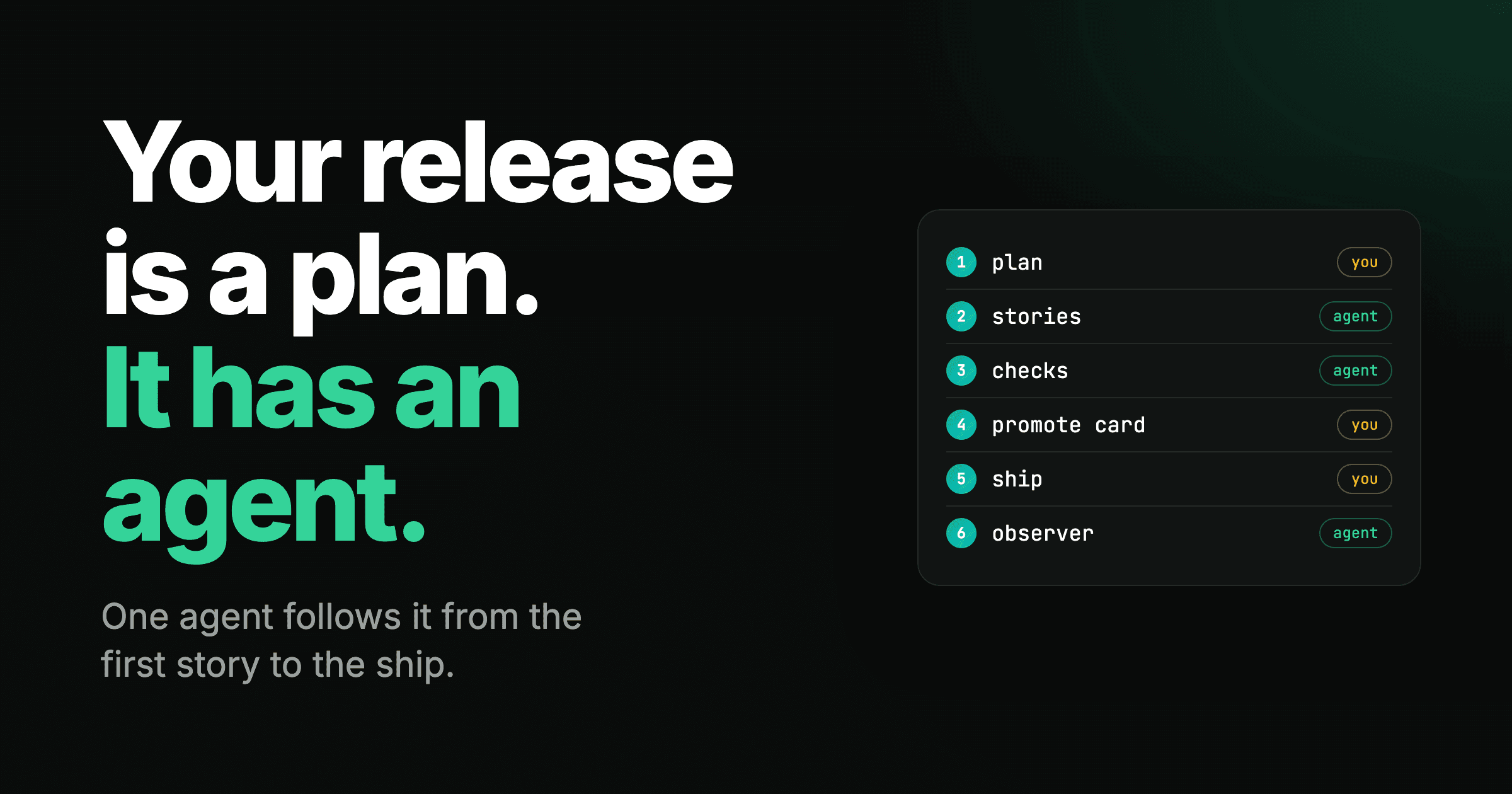
AI release management usually means one of two things: an agent that reviews the pull request, or a dashboard that watches the rollout. Neither one owns the release. Nobody holds the whole plan from the first story to the ship, so a human keeps the plan in their head, and the head is the bottleneck.
Trinity 0.7.0 changes what a release is. A release holds its whole plan, and one release agent follows that plan from the first story to the ship. You answer cards for the calls that are yours. Everything else, the agent chases.
Plan
One Architect thread plans one release: phases, epics, stories. Your first commit moves it out of draft.
Queue
The release agent takes the hand-off and asks Start the work? unless your permission mode answers it.
Stories merge
The agent wakes on every start, failure and merge, settles conflicts, and rechecks the rest of the plan.
Checks
Auditor, Runner, SEO, Versioner, Notes writer and Guard reviewer each run as an agent with a verdict.
Promote
One card: Ship, Integrate, Ship Now or Not yet, with the route and each package’s proposed version.
Ship
Each reached package bumps, gates and tags. Publishes go dependencies first, pointers move on your approval.
Observe
One observer per release criterion checks what really shipped, in a sandbox on the shipped tip.
The release is the problem, not the pull request
Agents now write the stories. Say ten of them merge in an afternoon, and each one passed its own review.
Then the release gets harder, not easier. Story four moved a file that story seven assumed was still there. Two merges conflict. A staging target goes red and nobody knows whether the release caused it. Somebody has to notice all of that, in order, before the tag.
That somebody used to be you. Tools around the edges help. AWS now offers a release readiness review in its DevOps Agent that assesses changes before production, and LaunchDarkly announced Release Autopilot for release control of AI-built code. Those tools look at the change or the rollout. Trinity's agent starts earlier, at the plan the changes came from.
A release is a plan. So we gave the plan an agent.
A release holds its whole plan
Every release is release, phases, epics, stories. The tree is the same everywhere in Trinity, and we told the story of why the old PRD folded into it in Goodbye PRDs.
A release's page opens on Conversation, Stories and Graph tabs. The graph shows how your releases depend on each other, and opening one shows its stories. Follow-ups, must-fix stories and CI fix stories group in a Follow-ups epic or phase, so nothing floats outside the plan.
The plan comes from the Architect. Each Architect thread is created with a draft release of its own, and your first commit moves it out of draft. One thread plans one release. The Architect also works out which releases yours depends on, and checks again when another release's plan changes.
When a round commits a plan, the Architect hands the work to the release's agent. That is where the agent takes over.
The release agent follows every story
The agent asks Start the work? unless your permission mode is Allow, then queues the work. One queue per release is shared by everyone on the project, and each machine runs one release at a time.
From there, it wakes when a story starts, stops, fails, is taken over or merges, and posts what is in the release, what is done and what blocks it. Its decisions are specific:
- A story fails. The agent decides what the failure means: re-run it, hand it back with guidance, send it to the Architect, or ask you.
- Merges conflict. It settles the conflicts of everything it merges.
- The plan drifts. After every merge it checks the rest of the plan for moved files and broken assumptions, and sends what must change to the Architect for your approval.
That last one is the point. The agent never edits a story itself. It finds the drift, and the change goes through the same approval as any plan.
The agent explains and chases. It never answers a card your automation level leaves to a person, and you can Pause the release and Resume it. Read the full rules in the release agent docs.
Checks run as agents you can open
When the release is ready, its checks run. The Auditor, Runner, SEO, Versioner, Notes writer and Guard reviewer each run as a sub-agent on a thread you can open from the Checks stage. Each ends with a verdict, Pass, Concerns or Fail, and a judgment you can act on.
You are not trusting a green badge. You can open the thread and read why.
Two more checks sit around them:
- The combined tip. When two or more stories have merged, every package's full gate runs on the combined tip, because a break that only the combination causes should show before a promote.
- A red staging target. It wakes the agent, which sends a CI investigator to say whether the problem is the release's own. When it is, the finding becomes a must-fix story.
The release's documentation is consolidated in a closing checkpoint before it ships, so the docs match what shipped.
Testing you choose
How much testing a release pays for is a project setting. Test gate rigor runs from None through Lean and Standard to Strict, and a story's gate runs only the tests its change reaches. The reasoning is in Your test suite is a tax.
Promoting is a card you answer
Shipping stays a human decision. The release thread posts a promote card with four answers: Ship, Integrate, Ship Now or Not yet. It shows the route and each package's proposed version. A hotfix or patch says what it will do first and offers only Ship and Not yet.
Before that, one more card. If the release is ready with follow-ups still open, a Leftover follow-ups card lists a row per problem. You choose Fold in, Spin off or Leave open for each, and the promote card is refused until every row is decided.
Checks · each one a thread you can open
Example verdicts. Each comes with a judgment you can act on.
Leftover follow-ups · one row per problem
Promote · refused until every row is decided
Answering the promote card starts the walk. Stop promote and Stop publish halt a running walk after a confirm. Version Check Failed and Pointer Move are cards on the thread too, and you can pin the version a package lands at.
A red package does not hold the others
Most real projects are more than one package. A release should not bump, gate or tag the ones it never touched.
Trinity reads which packages a release reached from .trinity/structure.json. A package is reached when the release changed a folder inside it or one it embeds. Only reached packages bump, gate and tag. Each reached package's gate runs on a throwaway checkout.
When one goes red, it is held with no version and no tag, and the others proceed.
The release changed folders in three packages.
Example packages and versions. Which packages a release reaches comes from the folders it changed, as declared in .trinity/structure.json.
Each target keeps its own state, so 1.4.0 can be live on web and in review on iOS. The release docs cover how those targets are tracked.
Release candidates work the same way. A cycle of candidates stays integrated until its final ships with every unit it changed. The release candidate rules say how the numbers count.
Publishing goes dependencies first
When a package ships to a registry, Trinity publishes every package under a holding tag first, dependencies before dependents, so nothing a consumer installs can resolve a dependency that has not landed. Then it stops and waits for your approval to move the real pointers.
A package whose publish fails is recorded with the registry's reason. Its dependents upload nothing, every other package publishes, and the walk reports one line per failed package. A publish also refuses a package whose tarball lacks the files its manifest points to.
The release is checked after it ships
The ship is not the end. Once a release ships and its packages are published, one observer per criterion checks it against what really shipped, in a sandbox on the shipped tip.
Those checks are real. An observer can install a released package from your private registry, drive the published page in a browser, or load the release's built extension.
A failure that waiting cannot change shows at once as a card: Patch, Roll back, fix and retry, I did it, check again, I checked it, it holds or Leave it. The release is judged against the criteria it was planned with, not against whatever someone remembers to check.
Limits you set, in advance
An unattended release needs a ceiling. A release carries a spend limit and a time limit, copied from your project's defaults and changeable from its Automation tab.
At a limit, stories already running finish and nothing new starts. A card asks you to continue by a step, continue to the end, or stop. Under the unattended levels the release stops at once.
What the agent will not do
An agent that owns a release needs edges, and ours are written down.
- It does not answer a card your automation level leaves to a person.
- It cannot change the release's automation settings.
- It never starts, stops or kills a machine or a promote. It proposes the promote as a card, and a person answers it.
- It changes no story itself. Plan changes go to the Architect for your approval.
The one place it acts on a failure by itself is a story that fails for good. There it reads the failure and moves the story on, within the retry budget your automation level gives it.
It also measures your project's health once, when the release becomes ready: gate time, test counts, the files that change most. A measure past its budget becomes one follow-up you can schedule as setup debt. Debt never holds a release or a promote.
What changes for you
Before, you held the plan and chased the work. Now the plan holds itself, and the agent chases.
You still decide the things that are yours: commit the plan, start the work, answer the promote card, approve the pointer move. You stop doing the rest: watching merges, finding conflicts, rechecking assumptions, working out why staging is red.
We wrote about the machinery underneath in Inside Trinity's release pipeline. This is the layer above it: a release that knows its own plan, and an agent that follows it to the ship.
Start a release from the Releases page with New Release, and plan it with the Architect. The release docs walk through every card.