AI agent sandbox: how Trinity lets agents act safely
A coding agent runs whatever command it decides to run.
That is the job, and it is why an AI agent sandbox matters more than any prompt. A prompt asks the agent to behave. A sandbox decides what a misbehaving command can touch. Trinity runs every agent command inside one, and it puts two more layers on top that answer different questions: how far a tool may reach, and who answers when an agent asks for more.
This post is the whole model, end to end, and the part we have spent the most time on: tuning the fence until each refusal is proven by a test that runs a hostile command inside the real thing.
Three layers, three different questions
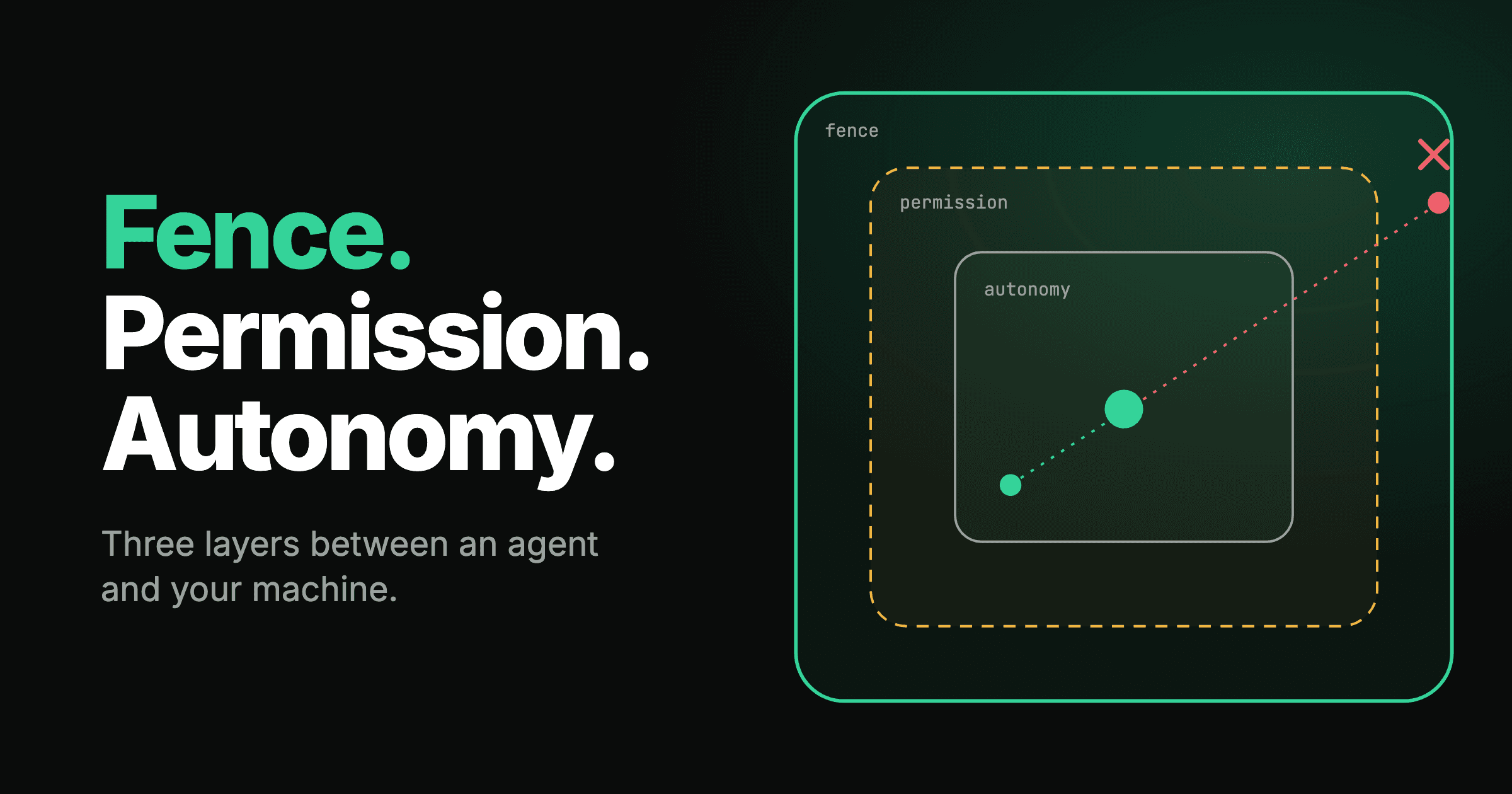
Most "agent safety" talk collapses everything into one switch. Trinity keeps three layers apart, because each one answers a question the others cannot:
- The fence answers: what can a command physically reach?
- Permission mode (Block, Ask, Allow) answers: how far may an agent reach for access beyond its role?
- Autonomy level (Supervised, Mostly unattended, Unattended) answers: how many of those questions answer themselves?
The last two are independent. Permission mode decides how far tools reach. Autonomy decides whether the agent decides for you. Set either one and the fence stays exactly where it was.
Permission mode
How far may tools reach?
Asks you for access or a tool its role lacks, and waits for your answer.
Autonomy level
Who answers the cards?
Every card waits for a person, and so does every access ask.
Under Ask and Supervised alike, a command still cannot read your credentials or reach a host nobody allowed. Neither dial moves it.
Pick Allow and Unattended together and you have the loosest setting Trinity offers. A command in that run still cannot read your SSH keys. We will get to why.
The fence: every command runs inside it
Every spawn, on both the Claude and Codex drivers, goes through one seam before it runs. The fence is built on Anthropic's open-source sandbox-runtime (srt), which enforces filesystem and network restrictions at the OS level without a container. On macOS it generates a Seatbelt profile and applies it with sandbox-exec. On Linux it uses bubblewrap, the unprivileged sandboxing tool Flatpak builds on, with a private network namespace. srt describes itself as a research preview, and we treat it that way: we pin an exact version and carry a patch.
The policy is simple to say. Writes are fenced to the project. Reads deny your whole home directory and re-allow a short list: toolchain homes like ~/.cargo and ~/.nvm, git's config, and the project itself. Nothing else under ~ is readable. Credential stores, shell history, every browser profile, your own ~/.claude and every other run's home stay denied, and a later re-allow cannot lift those denies.
.env* files are denied inside the project too, with a carve-out so a committed .env.example
stays readable. A worktree's .env holds placeholders anyway. The secrets
post covers why.
Green passes through an opening in the wall. Red meets the wall and comes back.
Network follows the same rule. Traffic leaves through srt's proxy, which is default-deny: a run reaches the model providers, the hosts its role needs and the ones you grant, and nothing else. On Linux the network namespace cuts loopback entirely, so a dev server's port goes through a per-port bridge.
Two engines, one contract
macOS and Linux enforce the same promises with different machinery, and the gaps between them are where the work went.
The engine
macOS · A Seatbelt profile, generated per run and applied through sandbox-exec.
Linux · bubblewrap: its own user, PID and mount namespaces, and a private network namespace.
Another process’s argv and environment
macOS · The KERN_PROCARGS2 read is refused for every process but the caller itself.
Linux · The fence has its own /proc. A process outside it has no entry at all.
A sibling’s memory
macOS · No task port: the profile drops mach-priv-task-port.
Linux · The MCP server is non-dumpable, and Yama ptrace_scope must be 1 or higher.
Unix sockets
macOS · Seatbelt path rules name the one proxy socket.
Linux · seccomp blocks socket(AF_UNIX). A variant built from source, hash-pinned, admits the agent socket under a masked filesystem view.
Loopback
macOS · Only the ports a run names. The host’s loopback is shared.
Linux · Private loopback. A per-port bridge exposes a dev server to the browser.
Two details show how the engines differ.
On macOS, a process can ask the kernel for another process's argv and environment with sysctl(KERN_PROCARGS2). The stock profile lets it. We denied that operation (process-info-pidinfo) and allowed it for (target self) alone. The obvious fix, denying process-info* for (target others), does not work: others leaves out the caller's own process group, and the srt process, the claude process and the fenced shell all share one. We only found that because a test tried it.
On Linux, the stock apply-seccomp helper blocks creating any Unix socket, which also blocks Trinity's own agent socket. A command that needs it gets a variant built from source on the machine that ships it: the same program, a filter that blocks only the io_uring calls, and a build script that refuses to compile unless the upstream source matches a pinned SHA-256. The filesystem view then hides the temp, /run and /var/lib trees so the wider socket cannot reach a neighbour. seccomp filters system calls with a BPF program, and an unprivileged process can install one only after setting no_new_privs.
What we patched in srt
Our fixes live in one patch against srt, and every hunk has a test:
- Argv stays private on macOS.
process-info-pidinfois(target self)only, as above. - No task ports. The stock profile allows
mach-priv-task-portfor a process in the same sandbox, which is read and write access to its memory. The patch drops it. - Background jobs stay quiet. zsh renices every
cmd &withnice(5). Seatbelt gates that assystem-sched, so each background job printednice(5) failed: operation not permittedinto the agent's output. The patch allows it for the same sandbox. A process can lower its own priority, and the kernel still refuses to raise it. - Symlinked allowed paths survive on Linux. A bind shows its target, so a toolchain symlinked out of the home was unreachable. The patch recreates the link instead.
- Absent deny paths become empty read-only directories, not
/dev/null, whichgit add -Achoked on.
Linux needs Yama, and says so
On Linux, a command is a descendant of the process that holds credentials. Opening /proc/<pid>/mem is a ptrace-attach access, and with the Yama ptrace_scope at 0, a process may attach to any other process of the same user. At 1 or higher, the Ubuntu and Fedora default, attach is limited to descendants, so the read of an ancestor is refused. We probed a Docker Desktop kernel with no Yama at all and found a key in the parent's memory.
So Trinity refuses to run a fenced command on a Linux host with Yama absent or at 0. The Setup screen marks the sandbox prerequisite unmet and names the fix: sudo sysctl -w kernel.yama.ptrace_scope=1, plus a file in /etc/sysctl.d/ to keep it. A refused spawn never runs unfenced.
The one process that must hold a credential, the MCP server, adds a second lock. It calls prctl(PR_SET_DUMPABLE, 0) first thing, and a non-dumpable process cannot be attached to with ptrace. Credentials reach it by pipe and descriptor, never by environment or argv.
How we tune it: hostile probes with controls
A fence you cannot test is a belief. Ours has integration tests that run a hostile command inside the actual Seatbelt or bubblewrap sandbox and assert the refusal: reading another process's argv, reading a keychain, opening an unnamed loopback port, writing into the files a run's next spawn would load, looking inside another run's home.
The hard part is not the probe. It is knowing a refusal means something.
Control · Outside the fence
$ read the victim’s argv
Proves the probe can see the canary at all.
Probe · Inside the real fence
$ read the victim’s argv
The same command, now fenced.
The case passes only when both hold. A shell that never started would also read nothing, so every probe prints a start marker first, and no marker fails the case.
Every case plants a canary in a victim process started outside the fence, runs the probe from inside, and prints only an outcome token, never the canary. A control runs the same read outside the fence, which proves the probe could see the canary at all. If the control fails, the case fails, because an empty result might just be a broken probe. And every probe prints a start marker before anything else, because a backend that never started would also "refuse" everything.
That is how the (target others) mistake surfaced, and how the nice(5) regression did: a test runs a backgrounded command under zsh and asserts that stderr is empty.
Secrets: placeholders in, real values on the wire
The fence keeps credentials unreadable. The other half is making sure the agent never needs them. A worktree's .env holds placeholders, and the real value is written into the request by the proxy on its way to the host it is meant for. A process Trinity launches gets its values at launch. The agent's process tree never holds the value, so there is nothing for a thorough cat or env to find.
That is a post of its own: AI agent secrets: keeping .env files out of agents' reach.
Permission mode: how far tools reach
The fence is the same for every run. Permission mode is the dial you turn, and it decides how far an agent may reach for access its role does not already hold.
- Block never asks you for access. A run that needs something its role lacks works without it.
- Ask is the default. A run asks, and waits for your answer. It stops what an agent changes or runs, never what it reads:
cat,grep,lsandgit lognever ask. - Allow also gives a run the built-in tools its role leaves out, such as editing files and running shell commands. If an agent needs a command-line tool Trinity has an install recipe for, it installs itself, unless the recipe needs your sign-in or password. Under Mostly unattended or Unattended that request is denied instead.
Allow never moves the sandbox. A run still cannot reach outside its fence, and a read-only role stays read-only. Flip the mode below and watch two requests: one for a tool the role lacks, one that tries to go past the fence.
Request for a toolRequest past the fence
Ask parks the request until a person answers. It then goes through, or it is denied. Reading never asks. A request past the fence stops at the wall in every mode.
The mode is set where it is most specific: the run or conversation, then its story or release, then the project, then Ask. A member can tighten any of them. Setting one looser needs a workspace owner or manager. The composer shows the result as a chip, so you never guess what the next turn runs under.
The most specific setting wins:
Autonomy level: who answers the cards
Permission mode says how far tools reach. Autonomy says how many of the resulting questions answer themselves. It follows the work, not the person: the story's or release's own level, else the project's, else the workspace's, else Supervised.
At every level, these wait for you
At Supervised, every card waits for you. At Mostly unattended, the story cards answer themselves, including the PR review, which merges without asking. At Unattended, the quality checkpoint does too. A story whose audit left an unmet criterion or an unfixed critical finding still stops at the review, whatever the level.
Access asks follow the level. At Mostly unattended and above, the story's own agent answers: it allows what the spec and plan show the work needs and denies what they do not. When that agent cannot be reached, the level grants the ask itself, within the run's sandbox. Only a file, a host or a tool, for This run or Once, is answered this way. A request for the whole fence waits for you at every level, and so does an ask that keeps coming back: after three answered in a row, the next one waits, with the reason on its card.
The release agent's decisions follow the same level: queueing handed-off work, starting checks, retrying or handing back a failed story, investigating a CI failure and filing its fix story, landing a follow-up, and settling a question from the Architect or a story. At Supervised, it asks on a card first. You can set each decision apart from the level.
The two dials stay independent. A thread set to Allow still asks where autonomy asks, and one set to Ask still decides where autonomy answers.
What always waits for you
Some cards never answer themselves, at any level: missing secrets, a failed or unverified check, a story that ran out of attempts, a registry pointer move, a request for the whole fence, and a placeholder leak found at a checkpoint. They need your credential, your judgement or your machine, and no setting hands those to an agent.
Every decision leaves a record you can undo
Unattended does not mean unseen. Every ask answered without you leaves a quiet "btw" note on the story's thread, with no banner: what was asked, what was decided, by whom (the story's agent or the level) and why. Each grant it made carries a Revoke.
btw · illustrative note on a story thread
Allowed a read of ../shared/tokens for This run. Decided by the story’s agent under the project’s Unattended level, because the plan imports from it.
The story’s thread
A quiet “btw” note: what was asked, decided, by whom, why.
Settings, Asks
The row: who decided, from which device, how long it took.
Activity, under the release
Each release-agent decision, with its level and tier.
Your inbox
A quiet entry when a review was skipped by your settings.
A revoke takes effect the next time the run starts a process. One already running keeps what it holds. The same decision shows up in Settings under Asks, reading "Granted by the project's Unattended autonomy level" or "Allowed by the agent above the run", and each release-agent decision is recorded in Activity under its release with the decision, the level and the tier. Grants, revokes and consumptions append to a synced event log, so the history survives a change of device.
Honest limits
A fence that overclaims is worse than none, so here is what it does not do.
- macOS shares one loopback. Seatbelt takes no port range, and one rule per ephemeral port would cost about 3.5 seconds on every spawn. So the macOS fence names the ports a run needs and refuses the rest, which means a test suite that starts a server on port 0 is refused there. Linux's private loopback allows it. The agents are told to report such a suite as not runnable under the macOS fence, not as a failing change.
- Linux has a brief window. The Codex token pipe's path is an argv entry. On Linux a fenced process can read
/proc/<pid>/cmdline, so the key is safe only outside the few seconds a window is armed. macOS cannot read argv at all. - Go on macOS can fail closed. For TLS-terminated hosts, Go before 1.27 verifies through the system trust service, which cannot vouch for the per-run CA, so the client gets a certificate error. Apple's own command-line tools fail the same way.
- Credential lists are lists. A custom browser profile directory is not on the deny list, and a credential store created mid-run is not denied until the next spawn.
- Allow adds built-in tools on Claude only. Codex runs the same in every mode.
- srt is a research preview. We pin it, patch it and test every patch, and we would rather say so.
Layers you can reason about
The shortest version: the fence decides what is possible, permission mode decides what is asked, and autonomy decides who answers. Each layer is a separate setting, each is recorded, and the first one holds no matter how you set the other two.
That is what lets you leave an agent running. Read how needs-you cards and autonomy work, set the permission mode in project settings, and see how agent failures recover when something does go wrong.