How Trinity builds accessible software by default
Everyone agrees accessibility matters. Almost nobody builds it in.
It gets deferred. The feature ships, the demo goes well, and the aria-label pass becomes a ticket nobody picks up. Then an audit lands — or a lawsuit, or a procurement checklist with "WCAG 2.1 AA" in row 14 — and a team that shipped fast spends a quarter retrofitting focus states, contrast ratios, and screen-reader semantics into code that was never built for them. Accessibility was treated as a sprint. It should have been a setting.
That's the bet Trinity makes. Accessibility is a property of the package — the coding compartment the work lands in — declared once and enforced on every story the agents ship. Not a cleanup pass. Not a checklist someone remembers. A conformance bar that travels with the work from the first line of generated code.
Accessibility is a setting, not a sprint
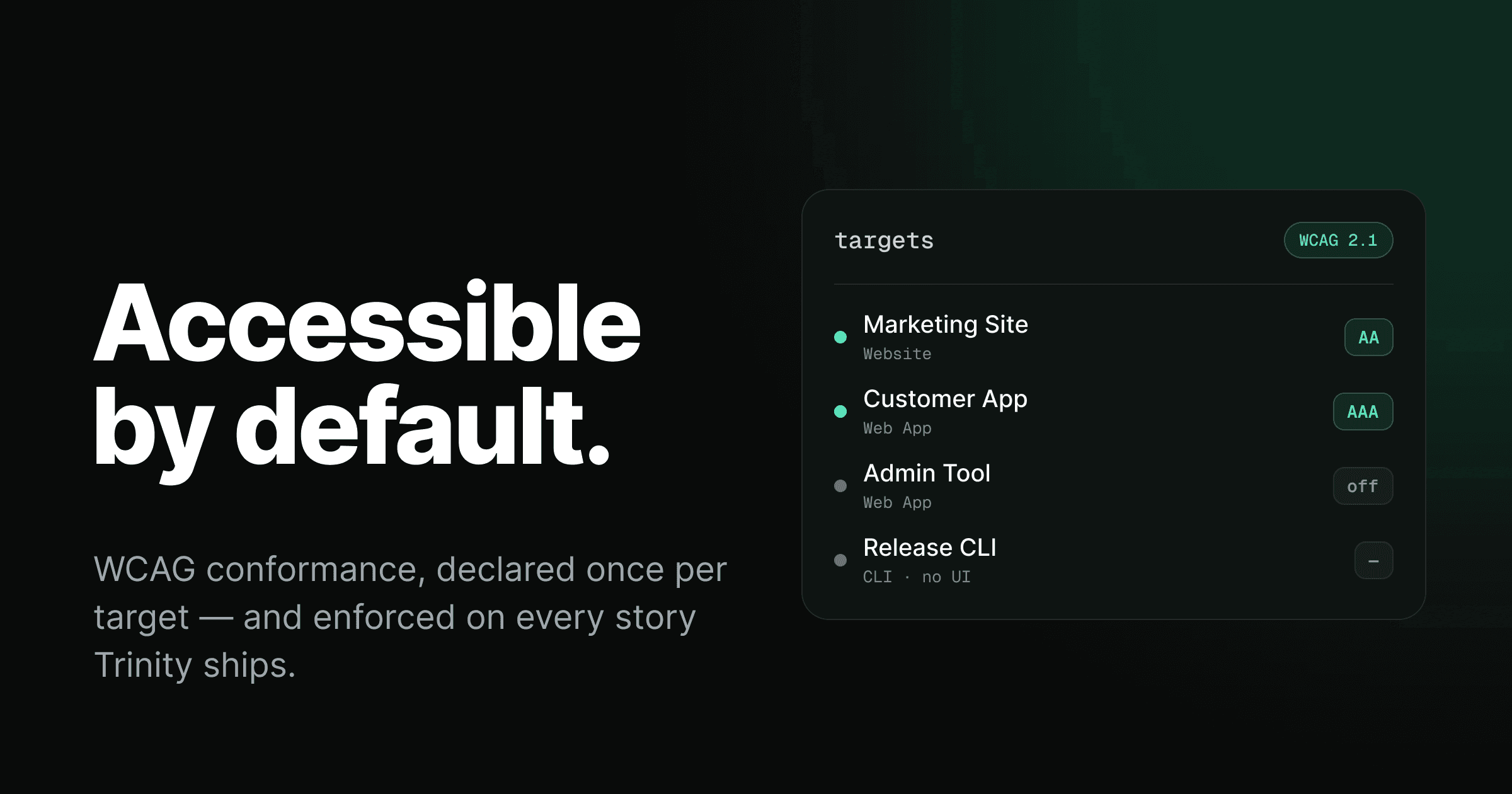
Here's the core idea. Every package that ships a UI-bearing artifact carries a WCAG 2.1 conformance level — A, AA, AAA, or off. A polyrepo doesn't get one blanket policy. Each codebase gets the bar that actually fits what it renders.
It reads one field off that one package row — AAA. Mobile and Web App aren't two bars to reconcile; they're two ships from the same components, so they share the one bar the package carries.
The marketing site's package sits at AA — the legal compliance bar in most jurisdictions. The customer app's package pushes to AAA, and it ships two artifacts, Mobile and Web App, from one React Native codebase — both inherit the same bar because they're built from the same components. An internal admin tool that three people on your ops team will ever open? No formal requirement, because spending engineering effort on AAA sign-language alternatives for an internal dashboard is theater, not accessibility. And the release CLI's package renders no pixels at all, so it never enters the conversation.
This is the part most tooling gets wrong. Accessibility isn't one-size-fits-all, and pretending it is leads teams to either over-invest everywhere or — far more common — give up and do nothing. Per-package conformance lets you be honest: strict where it counts, off where it genuinely doesn't.
A conformance level per package
Under the hood, this is a single column — not on the target, on the package. It lives there because accessibility is authored: semantic markup, focus order, contrast, and ARIA all live in the components at a manifest root, and a component two artifacts share cannot be written two ways. A package that ships at least one UI-bearing target (Web App, Website, Mobile, Desktop, Extension) can carry a level; a package that ships only CLI, API, or Library targets can't, because there's no UI in it to make accessible.
NULL means off. The constraint makes the three valid levels the only things that can land in the column. It's a deliberately small piece of state — and that smallness is the point. A target itself carries no level of its own; its published conformance claim just reads through to this one column, so there's no second copy anywhere to drift out of sync.
The three levels aren't arbitrary tiers, either. They map directly to WCAG 2.1, and each one is a strict superset of the one below.
| Level | What it guarantees | Typical fit |
|---|---|---|
| A — baseline | Text alternatives, keyboard navigable, no seizure triggers | The floor for anything with a UI |
| AA — standard | Sufficient contrast (4.5:1), focus management, ARIA labels | Public products — the ADA / EN 301 549 bar |
| AAA — enhanced | Enhanced contrast (7:1), full screen-reader support, richer alternatives | Products where accessibility is a core promise |
One package, one bar
A single codebase often ships more than one artifact. A React Native app emits a Mobile target and a Web App target from the same component tree — the <Button> that renders on both was only written once. So which target's bar applies?
Neither, because that's the wrong question. There's one package, one manifest root, one a11y_level column. Mobile and Web App aren't two things to reconcile — they're two ships from the same coding compartment, and the code that renders on both can't hold two different promises about what it conforms to.
A story's run scope reads that column off the packages its diff lands in — never off the artifacts they ship. Often that's a single package and a single field. But a story spans as many packages as the change touches: a workspace holds the project with all its repos, so a change to a client and the API it calls is one story, not two that somebody has to keep in step. When it lands in several, the bar is the strictest among them:
typescript a11yLevel: strictestPackageA11y(packages),
That's the whole resolution step, and strictest is the only safe direction. One run writes the components of every package it touches, so a story reaching into a AAA codebase is held to AAA wherever else it also writes — a laxer sibling can't talk it down. A package carrying no level contributes nothing rather than pulling the answer to the floor: null means it ships no UI or hasn't had a level set yet, and neither is a licence to write the AAA package's components to a looser bar.
What never enters the collapse is the artifact count, and that's the distinction the whole model rests on. Mobile and Web App from one package are one answer, not two to reconcile. The bar collapses across the codebases a change touches; it never collapses across the things a codebase ships.
Release scope is the same rule at a wider setting — the checkpoint audit takes the highest level across every package the release ships, rather than across the handful one story's diff touches. Same collapse, one shared implementation, so a story's bar and a release's bar can never be computed two different ways.
Agents only see the checks for their bar
Resolving the level is half the job. The other half is making sure the agent actually builds to it — without drowning it in standards that don't apply.
Trinity's quality checks for each platform are authored once, with every WCAG level inline, fenced by HTML-comment markers:
<!-- a11y:AA -->

### Level AA (Recommended)

- [ ] ARIA labels — interactive elements without visible text carry `aria-label`
- [ ] Contrast — text meets 4.5:1 (normal), 3:1 (large)
- [ ] Focus management — visible focus indicators, logical tab order
<!-- /a11y:AA -->

<!-- a11y:AAA -->

### Level AAA (Enhanced)

- [ ] Enhanced contrast — text meets 7:1 (normal), 4.5:1 (large)
<!-- /a11y:AAA -->
When an agent pulls the checklist for its story, the level its packages resolve to filters the document. Ask for AA and the AAA block is stripped before the agent ever sees it. Ask for A and both AA and AAA fall away. The agent gets exactly the bar it's accountable for — no more, no less.
GET /api/quality-checks?targets=Web+App,Mobile&a11y=AAThe right standard, scoped automatically
The agent building a story doesn't decide how accessible the result should be, and it can't over- or under-shoot. The conformance bar comes from the package the story lands in, the checklist is filtered to that bar, and the agent builds to it. Accessibility stops being a judgment call.
This is what "by default" actually means. The implementer isn't nagged with a separate reminder to care about accessibility — the relevant standard is simply the only standard in its context window, so building to it is the path of least resistance — and the design references the UX guidance leans on already treat keyboard support, focus order, and semantic markup as non-negotiable foundations rather than optional polish.
It starts at onboarding
None of this works if setting the level is a chore people skip. So Trinity asks once, at exactly the right moment.
During the project setup conversation, the accessibility question fires once per package, right after you've declared your targets — and only for a package that ships at least one UI target. A package that's pure CLI, API, or library never sees it, because the question would be meaningless there.
What accessibility conformance level should this package (Mobile · Web App) hold? AA is recommended — it's the legal compliance bar in most jurisdictions and the practical default for any app with users beyond yourself.
Pick a level and it lands on the package; every UI-bearing target it ships inherits the same bar, and a package with no UI target is pinned to off automatically. From that one answer, the whole chain follows: the column is set, and the checklists filter themselves. You can always tune individual packages later in project settings — an internal tool's package dialed down to off, a flagship surface's package pushed up to AAA.
The plan accounts for it before code exists
Accessibility that's only checked at the end is accessibility you spend forever retrofitting. So it enters the pipeline at the very first stage — planning.
When a story lands in a package that carries a level, the resolved level arrives as a section of its own — ## Accessibility Requirement — in the prompt of every phase that acts on it. The Analyst — the agent that writes the implementation plan before anyone touches code — reads it first and is told to plan for it explicitly: the accessibility requirements at that level, and the test coverage the build will need to prove them. The Implementer and the Auditor receive the same named section, word for word, alongside their filtered checklist, because one function composes it for all three — so the bar the plan was written to and the bar the code is built and reviewed against cannot drift apart. Semantic structure, keyboard paths, focus management, contrast — they land in the plan, not bolted on after a reviewer complains. And for a story whose packages carry no level at all, the section is absent entirely and the Analyst skips accessibility, so non-visual work never carries dead a11y ceremony.
Reviewed by an agent that was held to the same bar
A standard the implementer builds to is only half the story. The bar is also what the reviewer is held to.
After the Implementer writes the code, the Auditor reviews it — and it pulls the exact same a11y-filtered checklist, for the exact same resolved level, through the get_quality_checks tool. The conformance bar isn't just a hint for whoever writes the UI; it's the rubric the review agent grades against before the work can move on. On releases, the checkpoint audit runs the same strictest-across-packages collapse over a wider set, so the release gate and the story gate never disagree about where the number came from. The standard travels from the implementer to the reviewer untouched, because both read it off the same run scope.
That's the automatic enforcement: same level in, same checklist out, build and review agreeing on the bar.
Objective tests the pipeline resolves on its own
A reviewer reading a checklist is good. A machine that can't be argued out of its verdict is better.
For UI targets, Trinity's agents don't just review for accessibility — they write accessibility tests into the app they build. Every key user flow gets an @axe-core/playwright assertion, scoped to its package's WCAG level — ['wcag2a'] for A, ['wcag2a', 'wcag2aa'] for AA, all three tag sets for AAA. Axe is a real accessibility engine: it catches the 3.9:1 contrast an eye waves through, the missing label, the focus trap — as named, objective rule failures, not vibes.
Here's the part that makes it Trinity-shaped: those tests run through the same check-runner as every other test, and a failure doesn't block — it resolves. An axe violation flows into the Audit/Fix loop exactly like a failing unit test: the pipeline picks it up, fixes the markup, and re-runs until it's clean. Detection is objective; remediation is automatic; nothing sits waiting on a human to say no. And because the tests live in the generated project, the accessibility coverage ships with the app — it keeps guarding every future change, not just the first build.
Detect objectively, resolve automatically
Axe finds the violation, names it, and hands it to the Audit/Fix loop — which fixes it and re-checks until it's clean. A blocking gate just stops and dumps the problem back on you; a resolve loop closes it.
Verify against the running app, on demand
Generated axe tests and an agent review cover the build. A separate browser engine is the third opinion on top.
From a project's diagnostics you can run a live audit against any URL with pa11y, the WCAG standard pinned to its package's level:
pa11y "https://localhost:3000" --standard WCAG2AA --reporter jsonA maps to WCAG2A, AA to WCAG2AA, AAA to WCAG2AAA. The findings come back categorized — critical, warning, info — so you can see exactly where an automated engine disagrees with the build. It's the on-demand second opinion, run against the same conformance bar the pipeline already enforced.
Per-package accessibility is the same shape as the rest of Trinity: declare intent once, read it as a plain field everywhere it matters, and let the pipeline hold the line automatically. The conformance level is just one more property the pipeline carries from planning all the way to a merged, audited PR.
We didn't think of this. They did.
This feature isn't one I dreamed up. It was handed to me.
Before Trinity, I spent years at Broccoli Studios building software for Costa Rica's Ministry of Public Education — the MEP. Public-sector education software lives and dies by accessibility: the people using it span every device, every ability, every connection speed, and the legal bar isn't optional. Accessibility wasn't a nice-to-have on those projects. It was the job.
So when I was walking a few people from that world through a Trinity demo — not as customers, just a conversation between people who'd shipped a lot of UI together — they're the ones who pointed at the gap. Your pipeline plans, executes, and audits everything else. Why isn't the accessibility bar one of the things it carries? They were genuinely intrigued by what Trinity could do — but they don't run it. They just knew exactly what was missing, because they'd lived the retrofit-it-later pain more than anyone.
It was the kind of suggestion you hear and immediately know is right.
So I built it — and then I tested it myself. I had Trinity generate a small todo app, set its package to Level AA, and let the pipeline run. I went in skeptical. Keyboard navigation, visible focus states, proper contrast, labeled controls, sane tab order — all of it was just there, in the first pass, without me asking for any of it. I genuinely didn't expect the result to be that clean.
I set a todo app to WCAG AA, ran the pipeline, and the accessibility was simply done — keyboard nav, focus, contrast, labels, all of it. I went in skeptical and came out sold.
That's the whole pitch, really. The feature came from people who build accessible software for a living, and it held up the first time I leaned on it.
The takeaway
Accessibility doesn't fail because teams don't care. It fails because it's structured as the thing you do last — and last is where good intentions go to die.
Trinity moves it to the front and makes it ambient. One answer at onboarding sets a conformance bar on the package — the coding compartment every story that lands there builds against. There's nothing to reconcile across the artifacts a package ships, because they're built from the same code. The Analyst plans to it, agents build to it because it's the only standard in front of them, objective axe tests catch what slips through and the Audit/Fix loop resolves the failures, and a reviewer is held to the same bar. Strict where it matters, off where it honestly doesn't, automatic instead of blocking, and never a quarter-long retrofit.
The most accessible software is the kind that was accessible from the first commit. That's the only kind Trinity knows how to build.